Color Palette From a Photo: Five Colors From One Beach Shot
A five color palette from any photo, worked on one late-afternoon beach shot: give each color a job (dominant, support, light, dark, accent), pick spots instead of averaging, and check the five work together.
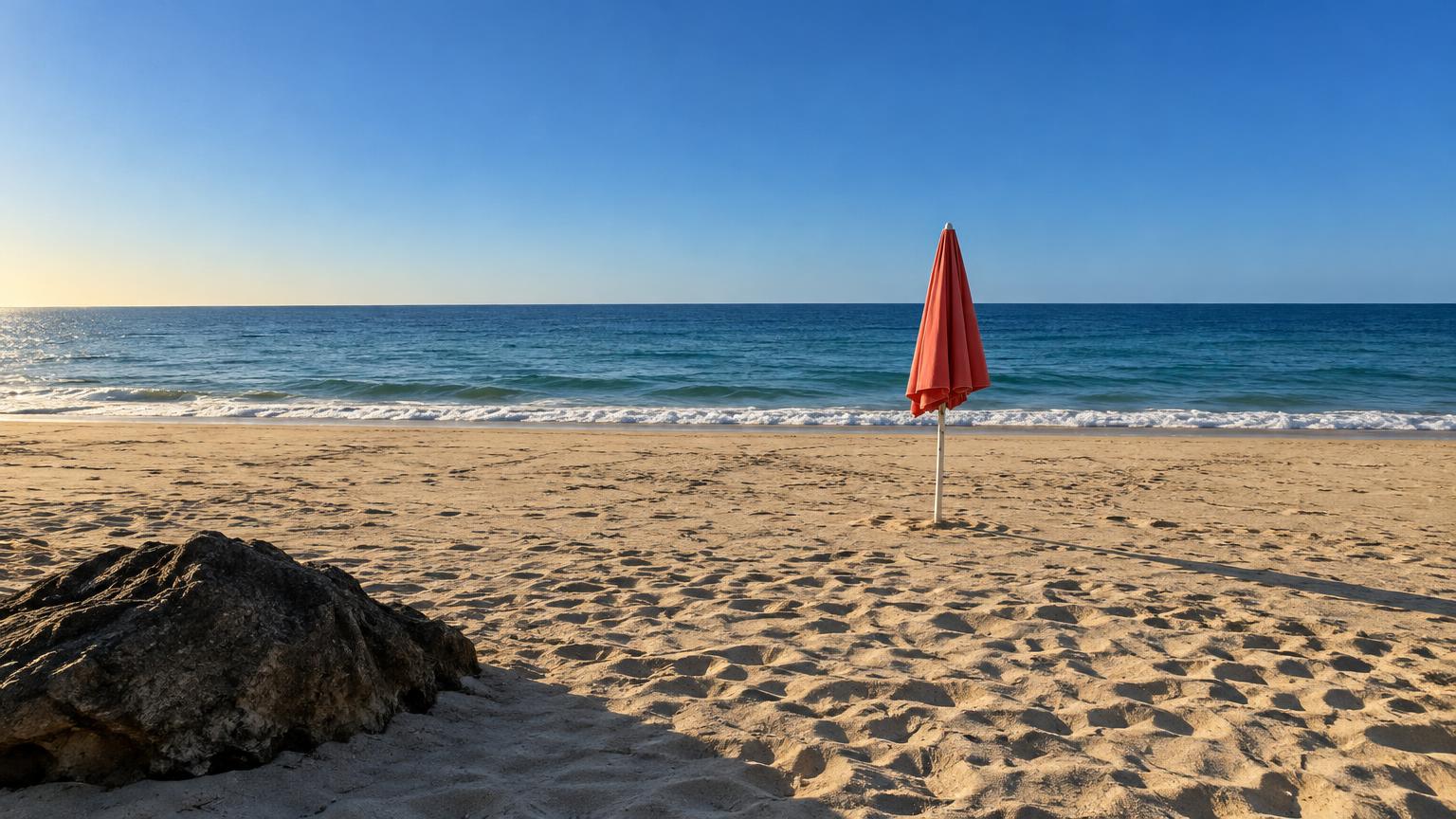
To pull a color palette from a photo, don't hunt for the five most common colors. Give each of the five a job: one dominant color that covers the most ground, one that supports it, one light, one dark, and one small accent that makes the rest come alive. A photo with side light and a single strong hue hands you all five. A flat, dim or heavily filtered photo hands you mud.
Here is how that works on one ordinary picture: a beach in late-afternoon sun, shown at the top of this post.
Start with a photo that has range
Before you pick anything, look at the light. The best photos for a palette have three things.
Light from the side. Late afternoon or early morning sun throws long shadows, so the same sand shows up as warm gold in the sun and cool grey-brown in the shade. That gives you lights and darks from one scene. Midday sun from straight above flattens everything into one bright middle tone.
One hue that owns the frame. In the beach photo it's blue: the sky and sea together fill more than half the picture. A palette needs that anchor. A photo where six colors fight for attention gives you six colors that fight on your wall too.
A small accent. The coral umbrella takes up a sliver of the frame. It's also the only warm, saturated thing in it, which is why your eye goes straight to it. Small and bright is exactly what an accent should be.
Photos that tend to disappoint: night shots full of grain, anything under mixed light (a lamp plus a window turns whites orange on one side and blue on the other), and pictures with a strong filter already baked in. You can still get a palette from them. It just won't be the colors you remember.
Give each color a job
Five colors is enough to work with and few enough to keep in your head. Here's what the beach gives, by role:
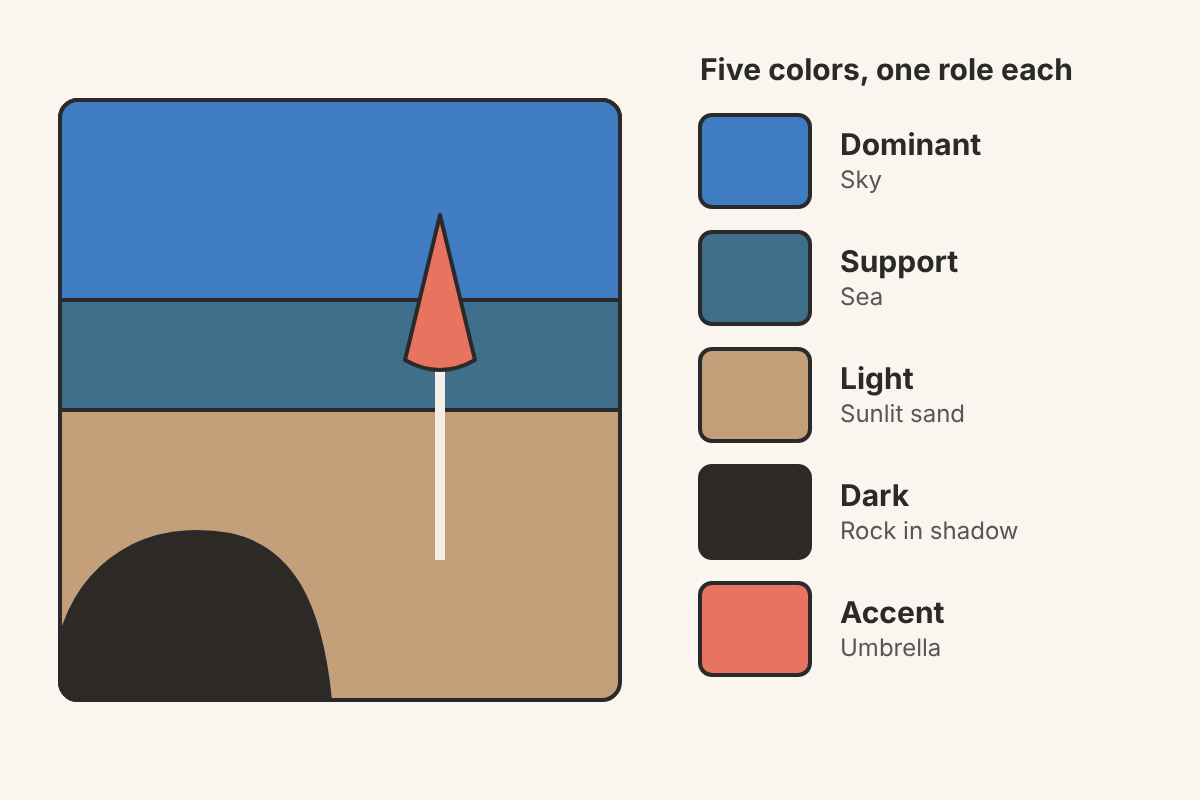
- Dominant: sky blue, around #407CC2. Clear and cool, the color of a day with no clouds. Use it where you want calm across a big area.
- Support: sea blue-green, around #3F6F8A. Deeper and greyer than the sky. It keeps the dominant blue from feeling flat and pairs well with it in text, trim or a second wall.
- Light: sunlit sand, around #C4A07A. Warm, dry, a little toasted. This is the rest-for-the-eye color: backgrounds, large fabrics, paper.
- Dark: rock in shadow, around #2E2B26. Nearly black, but warm. It reads softer than pure black and gives you something for type, outlines or a heavy piece of furniture.
- Accent: faded coral, around #E8735E. The umbrella. Use it sparingly, the way the photo does: a cushion, a button, one line of a logo.
Those hex codes come from small spots on the photo above. Your screen and the photo's light both shift them a little, so treat them as a starting point.
Pick a spot, don't average an area
This is the step most palettes go wrong on. If you draw a box around the sand and take the average color, you don't get sand. You get every footprint, every shadow and every grain mixed together.
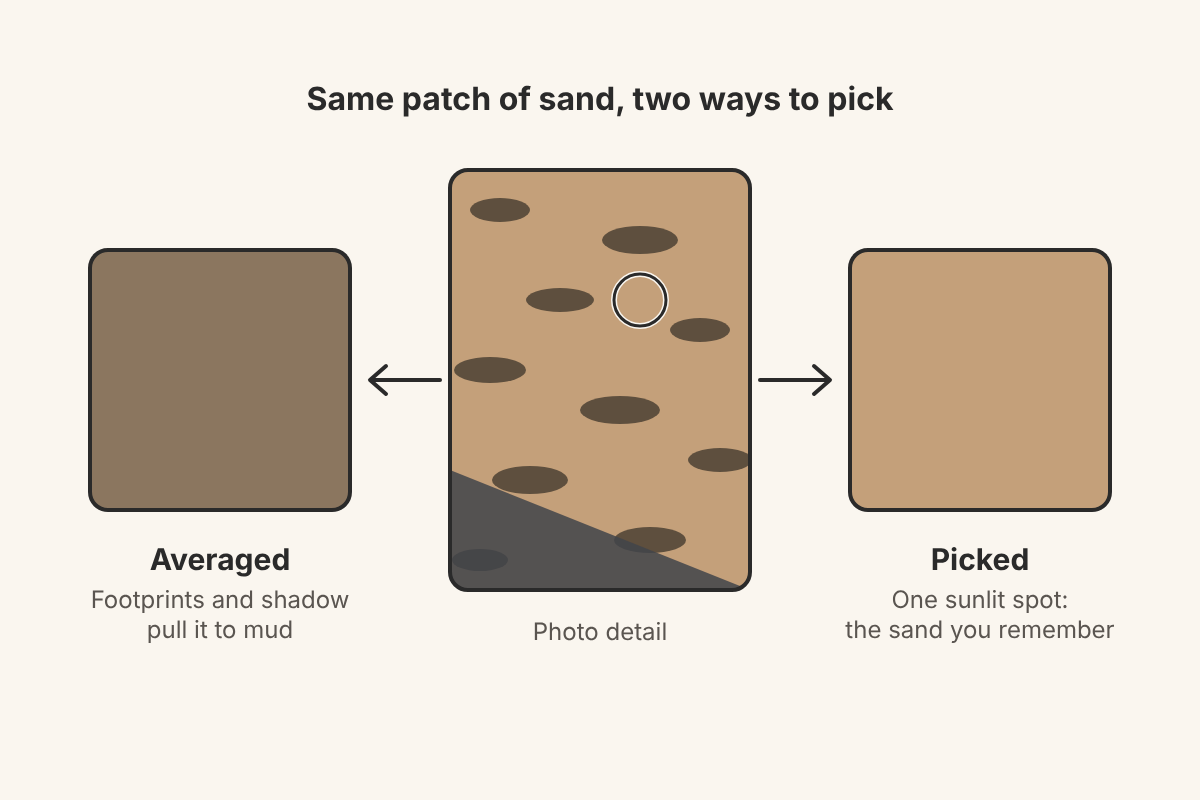
We tried it on the beach photo. A wide box of sand averaged out to about #8B765F, a dull khaki you would never call beach. One clean, sunlit spot gave about #C4A07A, which is what you see when you think of that afternoon. The same thing happens with brick walls, leaves, knitwear and anything else with texture: pick a spot in the light, not the whole surface.
Check that the five work together
Two quick tests catch most problems.
The squint test. Squint at your five swatches, or turn them to greyscale. You want a clear light, a clear dark and a few steps in between. If three swatches turn the same grey, they will blur together in use, and one of them should go.
One temperature in charge. The beach palette is mostly cool (two blues, a near-black) with warm sand and a warm accent. That balance is why the coral pops. Swap the coral for a second blue and the palette goes quiet. Swap the sky for a second warm tan and it turns sleepy.
Read the same scene warm or cool
The same photo can give two different palettes depending on what you lean on.
A cool reading takes the sky, the sea, the shadow on the sand, the rock and a pale sea-foam white from the surf. It feels like a breeze: fresh, a bit reserved, good for a bathroom or a calm website.
A warm reading takes the sunlit sand, the coral, the pale gold glow low on the horizon, the dark rock and only one blue. It feels like the end of the day when the sand is still warm under your feet. It suits a living room, a café menu or a summer wedding invitation.
Neither is more correct. Decide what you want the space or project to feel like first, then let that choose which parts of the photo you pick from.
Doing it in ColorMimic
ColorMimic was built for exactly this. You open a photo, and it turns it into five colors. The photo stays in your browser unless you choose to publish the palette.
If four of the five are right and one is off (often the accent, or a light color that came out a little grey), lock the four you like and re-pick the rest. That is the fastest way to steer the palette toward the reading you want: lock the blues for a cool version, or lock the sand and coral for a warm one.
When you're happy, download the palette as an image to keep next to your project, or share it as a public page. The shared link lasts 90 days, and you can revoke it sooner if you want it gone. That makes it easy to send to a painter, a client or a friend helping you pick fabric.
If you'd like to try it on your own beach photo, or any picture with good side light, create a palette here.
Name the mood before you use it
Last step, and the one people skip: give the palette a name. Not "Palette 3", but something that tells you how it feels. This one could be "Salt and late sun". A name helps you defend it later. When someone suggests adding a bright green to the room, you can ask whether green belongs in salt and late sun. Usually it doesn't, and you'll both know why.
